Technology | Sep 09, 2026
Protect eMMC Life with Write Rate Monitoring

During routine HMI operation, data is continuously written to internal storage (eMMC) for tasks such as data sampling, event logging, and operation logging. If the write rate remains excessively high or the total amount of data written increases too quickly over time, eMMC lifespan may be shortened. In severe cases, the file system may become corrupted, resulting in data access errors or even affecting HMI startup and operation.
Previously, engineers had to manually calculate the eMMC write rate from operating time and accumulated write volume, making it difficult to quickly assess the current eMMC write status.
Starting with EasyBuilder Pro V6.10.02.394, Weintek introduces two new system registers for cMT X Series HMIs. The runtime automatically calculates and reports the eMMC write rate, allowing engineers to easily keep track of internal storage status.
New System Registers for Easy eMMC Write Rate Monitoring
● LW-12835: Reports the HMI internal storage write rate in KB/min, for example, 500 KB/min. The value remains 0 until a valid result is available. Once valid, the value is updated every minute.
● LW-12837: Indicates the current measurement status of the internal storage write rate. The values are defined as follows:
Value | Status | Time Since Startup |
0 | Not enabled or read error | - |
1 | Startup Exclusion – Data from the first 10 minutes is excluded from calculation | 0–10 min |
2 | Collecting – Samples are still being collected; the minimum sample size has not been reached | 10–70 min |
3 | Valid with Partial Window – A valid result is available; accuracy continues to improve | 70 min–8 hr 10 min |
4 | Valid with Full Window – A valid result is available with higher accuracy | After 8 hr 10 min |
How to Extend eMMC Lifespan?
When the internal storage write rate status (LW-12837) reaches 4, it is recommended that the average eMMC write rate (LW-12835) not exceed 1,200 KB/min. Keeping the write rate within this range can help delay the eMMC health status (LW-12824) from degrading to 3: Poor, thereby extending eMMC service life.
Practical Example: Create an HMI Storage Monitor
The following example shows how to create a simple Internal Storage Monitor page in an EasyBuilder Pro project to display both the write rate and current measurement status.
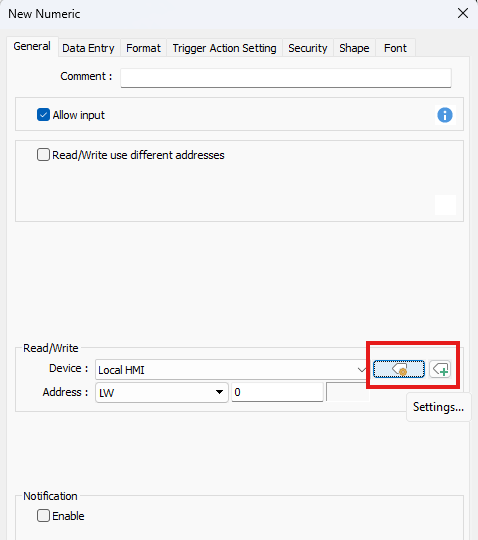
1. Add two Numeric objects to display the Write Rate and Write Rate Status. Click [Settings] in the Read/Write field to configure the address.
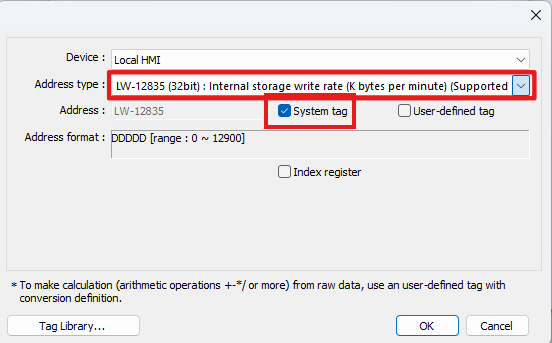
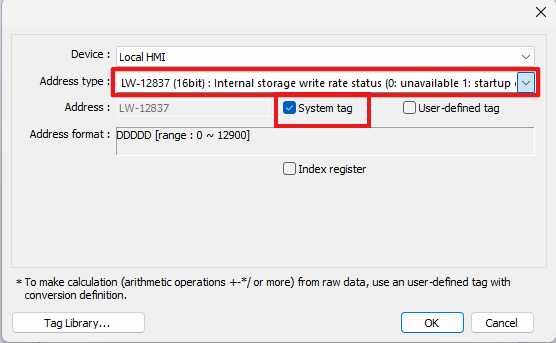
2. In the pop-up window, select [System tag]. From the drop-down list, select LW-12835 (32bit): Internal storage write rate and LW-12837 (16bit): Internal storage write rate status.
|
|
3. Add two Text objects and enter Write Rate and Write Rate Status as labels next to the Numeric objects.
4. Add another Text object and enter Internal Storage Monitor as the page title.
5. Download the project to the HMI. The current write rate and measurement status can then be monitored directly on the screen.
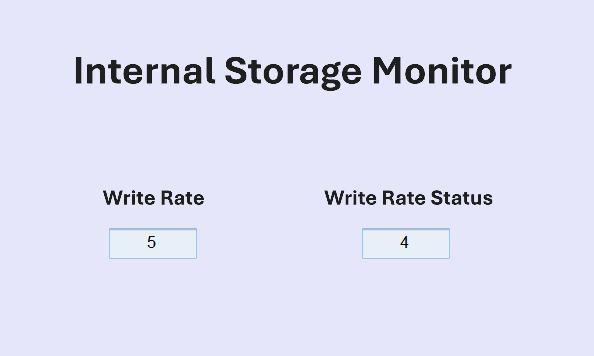
HMI example: Write rate 5 KB/min; status 4 (Valid with Full Window).
Additional Tip: Reduce Unnecessary Data Writes
In addition to monitoring the current write rate, project settings can also be optimized to reduce unnecessary writes. For example, increase data sampling intervals, reduce the frequency of historical data storage and synchronization, or back up historical data to a USB drive, SD card, or database server to reduce the write load on the eMMC. For more information, refer to the related document.
Stay Ahead of eMMC Wear with Real-Time Write Monitoring
The new EasyBuilder Pro system registers eliminate the need for manual calculations and provide a more direct view of the current eMMC write status. If the internal storage write rate exceeds the recommended range, the system will issue a predefined warning, helping engineers identify excessive write activity before it leads to read/write errors, bad blocks, or data loss.
Weintek continues to protect system reliability, down to every detail.
Note: This feature is available only on cMT X Series HMIs and requires an OS version released on or after July 15, 2026 to operate correctly. Please contact your Weintek distributor for details.